All SEO
  SEO News
  SEO Strategy
  Ask An SEO
  Enterprise SEO
  Google Algorithm Updates
  International SEO
  Link Building
  Local SEO
  Mobile SEO
  On-Page SEO
  Technical SEO
  Vertical SEO
  Wordpress for SEO
  Web Dev for SEO
  SaaS SEO
  E-commerce SEO
  AI-Driven SEO
What Is Google Trends? Uses, Benefits & How It Works 2026

Google Trends is a free tool by Google that shows how search interest for any keyword changes over time, across regions, and across platforms. It helps marketers, SEO professionals, content creators, and business owners make data-driven decisions based on what people are actually searching for — right now.
In 2026, staying ahead of search trends is no longer optional. Whether you are planning a content calendar, launching a product, or building a seasonal campaign, Google Trends gives you real-time signals that most keyword tools miss entirely.
At Ravi Gupta SEO(ravi-gupta.com), we have used Google Trends across dozens of SEO campaigns — from spotting breakout keywords before competitors to aligning blog publishing schedules with seasonal demand peaks.
In this guide, you will learn exactly what Google Trends is, how it works, and how to use it to grow your organic traffic and content visibility in 2026.
In this post, you will learn how you can use Google Trends to-
- Understand consumer behavior
- Optimize the marketing tactics
- Gain insights into the latest and future trends
How Google Trends Works in 2026
The way this system handles data is quite brilliant when you look under the hood. It takes a sample of the billions of searches made every single day.
This sampling lets the tool give us results in almost real time (which is great for breaking news).
It filters out repeated searches from the same person over a short period. This ensures the data stays clean and reflects broad interest instead of just one bot.
You can trust that these trending searches are coming from real human beings.
Normalization is the secret sauce that makes the whole thing work. Google divides the search data by time and location to keep things fair.
Without this a huge city like New York would always look more popular than a small town.
By using a ratio the tool shows us where a topic is actually most popular per person.
This is why Google Trends worldwide data is so useful for finding global patterns. You can see a trend starting in Tokyo and moving to London in a few hours.
Real-Time vs Non-Real-Time Data
There are two main buckets of data you can look at in 2026. Real-time data covers the last seven days and shows you what is happening this second.
This is where you find the Google Trends Hot Search items that are exploding. Non-real-time data goes all the way back to 2004 so you can see long term patterns.
We use the historical view to see if a topic is a permanent shift or just a fad. It is helpful to see if interest in a Google Trends product comes back every summer.
Understanding Google Trends: Your Guide to Search Insights
Google Trends is a completely free platform created by Google that monitors and displays what is trending in search queries.
It tracks search volume across different locations and languages while helping you identify patterns in what people are looking for.
Analyzing this data helps to spot emerging search topics and understand how user curiosity shifts over time.
In essence, Google Trends is a real-time search interest tracker that keeps bloggers, SEO experts, content creators, YouTubers, and business owners informed about what’s capturing public attention.
Key Points About Google Trends
- Google Trends is a no-cost platform from Google that measures keyword and topic popularity
- When you search any term in Google Trends, it displays a visual timeline showing interest levels across days, months, or years
- You can compare multiple keywords simultaneously to see which performs better
- The tool helps you discover what customers are looking for and understand their buying patterns
- You can spot sudden interest spikes in specific searches like Google Trends YouTube
- For example, when monsoon season arrives, searches for “raincoat” spike noticeably
- This insight enables businesses to schedule marketing campaigns based on what people are actively searching
Why Google Trends Matters in Modern SEO
Modern SEO isn’t just about ranking for high-volume keywords, it is about timing, relevance, and audience insight.
With Google Trends, you can:
- Track emerging trending searches before they peak.
- Discover seasonal patterns for products or topics (e.g., “AC servicing” peaks in summer).
- Align your blog posts, ads, and social content with what users are already exploring.
For example, if you notice a steady rise in “sustainable fashion,” you can create content early, position your brand as a thought leader, and ride the trend before it becomes saturated.
Why Should One Use Google Trends for SEO and Marketing?
- SEO Keyword Research: Search for keywords that are trending upward. SEO experts can use those keywords in their content.
- Content Strategy: Writers and marketers create content for the trending topics the audience is presently searching for.
- Trend Forecasting: SEO experts can mark early changing market trends and start working on them.
- Seasonal Marketing: Brands identify when consumer demand happens to be seasonal (e.g., “Valentine’s Day gifts” in February).
- Local SEO: Use Google Trends to view relevance and popularity for a keyword geographically.
- Competitor Analysis: Compare product-related searches with competing brands.
When, in turn, it is analysed to study the trends online, it helps businesses produce timely and relevant content.
Reading and Interpreting Google Trends Data
While the interface is simple, understanding what the data means is crucial.
- Rising vs. Top Queries: “Rising” shows queries growing quickly in popularity, while “Top” highlights consistently searched terms.
- Regional Interest: Discover which areas have the highest search interest for your keyword, useful for localized campaigns.
- Breakout Searches: These are queries that have grown by over 5000%, they often signal viral topics.
By analyzing these indicators, marketers can align strategies with real audience interests rather than assumptions.
Google Trends for Social Media and Brand Awareness
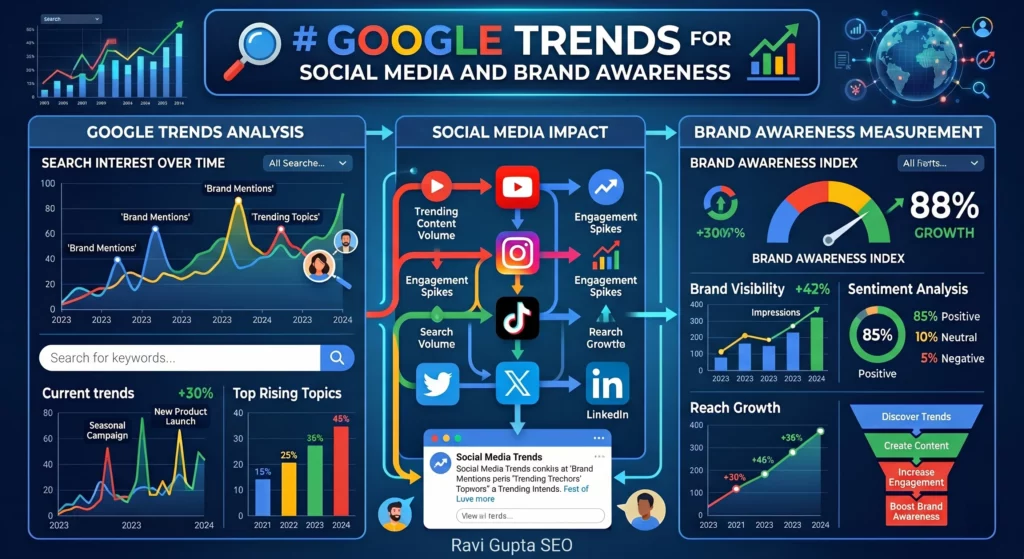
Beyond SEO, Google Trends worldwide helps brands shape their social media strategy.
- Use it to spot emerging hashtags or themes gaining traction.
- Time your social posts to align with viral moments.
- Identify influencer topics or news trends your audience already follows.
For instance, if “eco-friendly skincare” shows a rise, a beauty brand can create Instagram content or Reels around sustainability, just when interest peaks.
How Does Google Trends Work?
Google Trends operates on a straightforward system:
- Google collects data from billions of searches worldwide daily
- The platform filters out spam, duplicates, and bot-generated queries
- Popularity gets represented as a score from 0 to 100
- 100 = highest popularity
- 50 = half the peak popularity
- 0 = insufficient data
- You can compare keywords side-by-side (e.g., “laptop” vs. “tablet”)
- Regional results show where searches concentrate strongest
- Related queries section reveals similar keywords gaining traction
- This makes Google Trends straightforward to use for market research and SEO planning
Combining Google Trends With Other SEO Tools
While Google Trends offers valuable directional insights, pairing it with other tools amplifies your SEO game.
- Rank Math / Yoast SEO: Optimize trending topics with proper on-page structure.
- Google Keyword Planner: Combine trend data with exact volume metrics.
- SEMrush or Ahrefs: Identify keyword difficulty and SERP competition for trending terms.
This integration transforms Google Trends from a curiosity tracker into a full-fledged data-backed SEO strategy tool.
A Brief History of Google Trends
- Introduced in 2006 to release search data.
- At first, Google gave only limited data results, and now it is a more vast research tool.
- Now, it provides data on searches trending in a given country/category/time interval.
In the past years, it has been increasingly used by:
- Journalists: Use it when reporting on breaking stories.
- Marketers: Use it for doing digital campaigns.
- Researchers: Using it for studying online user behaviour.
- Businesses: Use it for looking into consumer interest.
- Marketing and SEO: Watching keywords and syncing demand to advertising.
- Journalists: Following popular topics and conducting news based on average search demand.
- Students and Researchers: Seeing what is trending in politics, culture, or health.
- Business Owners: Search for opportunities in product demand or directions in their industry.
- Content Creators: Watching trends for queries and creating content thereafter.
Conversely, it is beneficial to search Google for trends that are helpful to analyse limited public trends.
Key Features of Google Trends Explained
Google Trends offers several powerful features:
- Interest Over Time – Shows how many times people searched for your keyword during a specific period
- Regional Popularity – Identifies which areas search for your term most frequently
- Related Topics & Queries – Displays other searches happening around the same time as your target keyword
- Real-Time Data – Shows what’s trending right now and provides instant insights
- Comparison Tool – Compare multiple keywords to determine which has stronger demand
These features make Google Trends essential for SEO research, marketing planning, and content strategy.
Understand the Google Trends Dashboard
The Google Trends dashboard is simple and elegant.
- The search bar allows users to input any keyword or topic.
- Line graphs create the graph as the Interest over time, with popularity scores ranging from 0 to 100.
- Geographic maps associate zones with search activity.
- Filters allow the user to perfect the data by time range, category, and search type.
- The Related Queries section tends to show similar keywords that are trending upwards.
Common Mistakes to Avoid When Using Google Trends
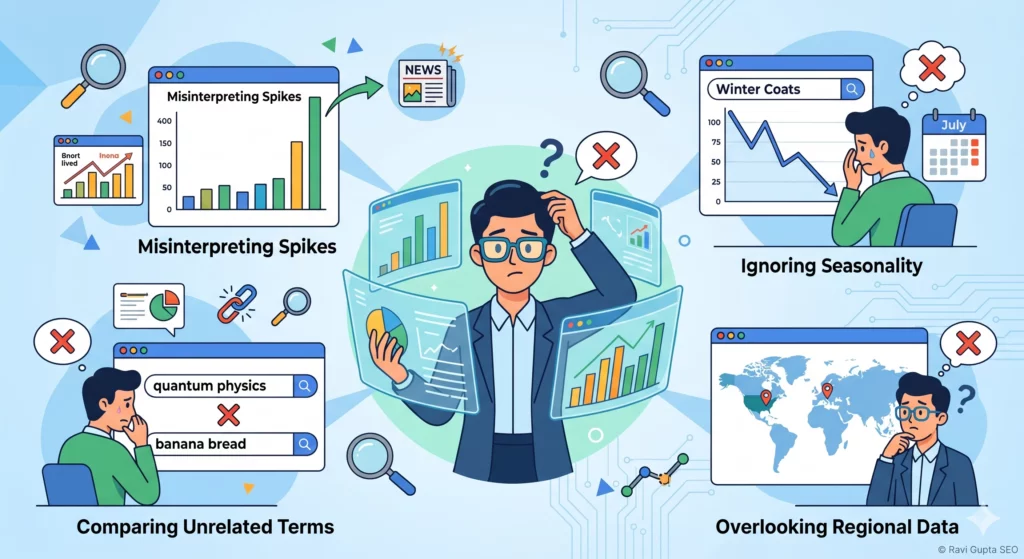
Even though Google Trends is easy to use, many marketers misinterpret its data. Avoid these pitfalls:
- Confusing relative popularity with absolute volume. A keyword with high popularity doesn’t always mean high search volume.
- Ignoring regional filters. Global trends may not match your target market.
- Relying only on spikes. Focus on sustained growth trends, not short-lived surges.
Understanding these nuances ensures you use the tool strategically, not impulsively.
Search Terms vs Topics: What’s the Difference?
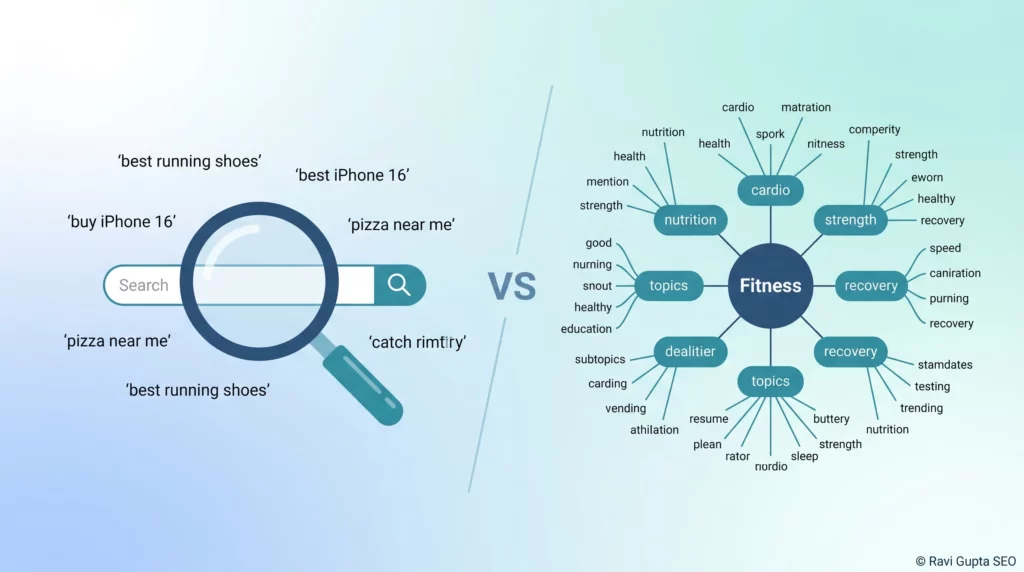
Letting users search can be done in two ways:
Search Terms:
- Exact keywords that people enter into Google.
- Example: The search term here will be “iPhone 15.”
Topics:
- Broader categories, indulging multiple variants.
- Example: An “Apple iPhone” topic includes all related models and searches.
- Recognising this difference is key for marketers to make sure they target actual Google search trends and topics.
Time Range, Categories, and Filters in Google Trends
Google Trends offers filters to make your research more refined:
- Time Range: Past hour, past day, past 5 years, or since 2004.
- Categories: Industries like health, business, sports, or entertainment can filter results.
Search Type: Interest can be analysed across:
- Web Search
- Image Search
- News Search
- Google Shopping
- YouTube Search
The filters can be combined by businesses to match strategies across trending searches.
Advanced features: Boolean and Topics vs Terms
Most users just type a word and look at the graph. That is a mistake (a very common one).
In 2026, the real power lies in using Boolean operators and understanding the difference between “Search Terms” and “Topics.” A “Search Term” is literal. If you type “Apple,” Google looks for that exact word. A “Topic” is smarter. It includes related words like “iPhone,” “MacBook,” and “Tim Cook.”
Always choose the “Topic” option if it is available. It cleans up the data by grouping related searches across different languages.
If you are looking at Google Trends worldwide, Topics are essential. They ensure you are getting the full picture of interest, regardless of whether someone searched in English, Spanish, or Mandarin.
You can also use operators like the minus sign (-) to exclude words. If you want to research “Galaxy” but don’t want results for the Samsung phone, you can search for “Galaxy -Samsung.” This makes your research much cleaner.
Using these advanced methods makes this a much more effective data-backed SEO strategy tool than just guessing based on a simple search.
What is Interest over Time on Google Trends?
Interest over Time is the most important feature in Google Trends.
The data is indexed on a scale that goes from 0 to 100.
- For 100, this indicates the highest popularity for the search term.
- For 50, the term is half as common as at its peak.
- For 0, this indicates there is insufficient data.
The analysts use this time-based data visualisation to derive insights into fairly long-term trends, seasonal trends, or spikes.
For example, the term “online classes,” which peaked in 2020, gives an instance of how Google Trends reflects real-life occurrences.
Use Cases & Benefits
Setting Up Keyword Research
Keyword research is the foundation stone of search engine optimisation, and Google Trends just makes it better.
- The platform helps analyse and expose trending keywords before they get very competitive.
- Put in several keywords for comparison; the keyword with the higher demand wins.
- Filter these according to interest by region, category, or even by the type of search.
- Spot seasonal changes; for example, “Christmas gifts” peak every December.
This way, marketers can create content that really corresponds to Google’s search trends based on true user intent.
Use Google Trends to Spot Trending Topics
- The utmost advantage of Google Trends is to find new topics of interest.
- The “Trending Searches” feature shows what’s popular in real time.
- Journalists and content creators can leverage this information to publish timely stories.
- Trending searches inform about the interests of the audience overlooked by traditional keyword tools.
- Great for catching viral opportunities ahead of competitors.
Great Content Ideas Generation for Bloggers
With the help of Google Trends, Writer’s block strikes bloggers often; Google Trends will, however, provide a remedy.
- Discover new content ideas while searching for related queries.
- You can compare different niche topics to see which one has a stronger appeal.
- Look at long-term trending searches that may be developed into evergreen content.
- Look at regional data and write local-oriented blogs.
Other Key Uses of Google Trends in 2026
You may use this tool in several ways because it supports a wide range of goals, from content strategy to market checks.
Many people review search interest to align content plans with peak times since publishing during high interest usually improves engagement.
Retail teams look for shifts in product categories that gain attention during certain seasons, giving them signals for stock planning or new product ideas.
Students and researchers use the graphs for assignments or case studies because the charts present simplified data.
Teams working on product launches often compare multiple related terms because the chart helps clarify which ones carry stronger traction.
If you build content, you may use the tool to explore related topics that people search frequently, which helps shape long-term planning.
Journalists and analysts use rising queries to trace local or global movement for fast-growing topics.
Many creators look at the data for content timing, since posting at the right moment increases your chances of stronger reach.
Google Trends for Ecommerce and Product Research
Selling products in 2026 requires more than just a good ad. You need to know if the market is growing or shrinking.
Using a Google Trends product search helps you avoid investing in “dead” niches. For example, if you see a spike in “modular home office pods,” you can check if that is a seasonal blip or a steady climb.
We use the “Compare” feature to look at competing products. You can put “Electric Bikes” against “Electric Scooters” to see which one is winning the cultural war.
It helps you decide where to put your inventory budget. In 2026, many dropshippers have failed because they ignored the downward slope of trending searches. They bought into a trend when it was already at 90 on the index, right before it crashed.
Global shipping and logistics are faster now, but consumer boredom is also faster. You can use the “Related Queries” section to find “breakout” terms.
These are searches that have grown by more than 5,000% recently. Finding a Google Trends product early means you can dominate the search results before the big retailers even wake up. It gives small businesses a fair shot at competing with giants.
Optimizing for Google Trends You Tube Shorts
Shorts are the fastest way to grow a channel in 2026 but they require a specific approach.
When we look at Google Trends You Tube Shorts we look for visual cues and audio trends.
The tool now shows which songs are being used most in high-engagement videos. If you use a trending song in your first five seconds your reach often goes up significantly.
It is all about capturing that immediate attention before the user swipes away. We find that humor and “behind-the-scenes” content perform best in this format.
The best creators use a mix of both formats to keep their audience engaged. You can use Google Trends YouTube to find a broad topic and then use Shorts to test angles.
If a specific Short gets a lot of engagement you know it is worth making a longer video. This data-driven approach takes the guesswork out of your content production.
You are essentially letting the audience tell you what they want to watch next. It makes the whole process feel much more like a conversation with your fans.
Google Trends YouTube
The section linked to Google Trends YouTube offers video-related search signals drawn from activity inside YouTube, giving you access to interest levels for topics people watch frequently.
This feature supports creators who want to develop ideas aligned with viewer interest because YouTube search behavior often moves faster than standard search patterns.
You can filter time periods and compare topics that relate to your channel theme, which helps shape content based on viewer demand.
The chart helps you sense peaks that guide posting schedules since audience interest usually rises before major cultural or seasonal events.
This option appears helpful for channels covering news, reviews or tutorials because these categories show noticeable shifts.
Google Trends Hot Search
The Google Trends Hot Search section highlights topics gaining sharp attention at the moment, giving you a window into fast-moving subjects that reflect real-time interest.
Many people check this area because it responds quickly to major news, sports events, announcements or viral stories.
It becomes useful for content teams needing timely material, since topics in this section usually draw high engagement rates.
You may review different categories to follow moment-specific interest shifts and choose items that match your audience.
The interface of Google Trends Hot Search displays numbers and movement indicators that help you understand pace and volume without complex steps.
Google Trends Worldwide
The Google Trends worldwide filter helps you examine search interest across global regions, giving a broader sense of how topics perform in different countries.
Many users check this option to see cultural differences in interest since topics grow at different speeds across regions.
This becomes useful for e-commerce teams targeting multiple countries because they gain an overview of markets that show rising attention for certain themes.
You can compare several regions at once, which supports better planning for content or campaigns. The view shows scores that help highlight areas with stronger activity.
Google Trends Product
Brands and sellers use Google Trends product data to understand attention levels for specific product categories, giving them signals about moments when customers search more often.
This helps in seasonal planning because interest usually climbs near certain events or holidays.
The charts present timelines that show long-term growth patterns, and these patterns often shape stocking decisions or new product ideas.
You may compare different categories to see which ones hold stable interest. Many teams use this for market checks since rising search signals often match increasing curiosity.
Google Trends You Tube Shorts
The section for Google Trends You Tube Shorts reflects search behavior around short-form content, giving creators a sense of what viewers look for inside the Shorts format.
Many channels explore this area because Shorts move quickly through trends and gain traction through repeated viewing.
You can track topic interest with Google Trends You Tube Shorts and match it with posting times since Shorts usually see fast engagement when topics peak.
The results help you decide which themes feel more relevant for short-form clips.
How to do YouTube SEO With Google Trends
Since it is the second largest search engine, YouTube works together with Google Trends for video creators.
- Use the “YouTube Search” filter to see whether topics are genuinely trending for the video format.
- One should be able to compare several topic ideas before deciding on the actual video production.
- Identify season-or-event-based content monetisation possibilities.
- From here, titles and descriptions can be generated that follow the trends dictated by Google Search. And that’s how they promote the growth of YouTubers on demand.
Some Benefits of Google Trends for E-Commerce and Brands
Brands and online stores are among the advantages of Google Trends worldwide information.
- Forecast demand for products, for example, the term air purifier might experience an upward spike in the pollution season.
- Inventory planning based on trending searches.
- Geographically design marketing campaigns with rising demands.
- Long-term changes in consumer behaviour.
- By using strategies in line with search interest, e-commerce businesses can slash costs and increase ROI.
8 Trending Products on Google Trends
People review product patterns through this platform to identify items gaining attention across months.
The list of Google Trends product below reflects broad categories that often rise through search interest during different parts of the year.
These categories shift over time, although they generally show repeated cycles. Teams watch these spikes because they hint at buying behavior supported by events or seasonal needs.
- Smart home assistants that appear during major sale periods with increased search activity
- Fitness equipment that rises during health-focused months early in the year
- Kitchen gadgets that increase before holidays since people cook more during gatherings
- Wireless earbuds that gain attention during event seasons
- Travel accessories that move upward near vacation periods and long weekends
- Skin care items that rise as people explore routines shaped by weather changes
- Pet care items that grow because owners explore new products for comfort and training
- Phone accessories that increase around product launches and discount months
Sellers track these Google Trends product categories to understand when interest forms clear patterns, and these patterns help shape stock flow and product decisions.
How to Use Google Trends for Product Research
Teams use the tool for product checks by comparing multiple items across stable time periods because the charts show interest shifts that guide ideas.
You may start by entering a product type and reviewing its pattern across twelve months to sense how interest rises or drops.
This helps you form early judgments about whether the item holds consistent demand.
You can review related topics to discover smaller categories linked to your main idea. Many sellers explore this section to learn which items gain traction before peak buying weeks.
You may study region interest to see which areas show stronger search movement. This helps businesses selling across multiple states or countries.
The rising queries section helps you catch early signals because sudden growth often points to fresh interest.
Sellers combine this with product pages or online reviews to judge which items deserve deeper attention.
You can compare product categories that compete with each other to understand which one offers stronger potential for future launches.
Using Google Trends for Seasonal Planning
People take advantage of year-long patterns by watching how interest changes across predictable times.
Seasonal peaks often tie into weather, holidays or cultural events. The timeline shows clear patterns if you explore categories related to fitness, travel, home decor or tech.
Many teams prepare early by studying these patterns because early preparation helps them build ahead of demand.
Seasonal planning supports sellers, content creators and service providers who rely on timing for better results.
This tool gives you a view of movement that helps you act at the right moment. You may follow a yearly pattern and prepare announcements or campaigns when interest begins to rise. This helps you align with user curiosity and build stronger connections.
Why Google Trends Is Better Than Traditional Keyword Tools
Among many keyword tools, Google Trends has some very special advantages:
- Real-time data on what people are searching for at the present moment.
- Relative popularity instead of mere search volume.
- Sudden spikes get highlighted, which other tools might miss.
- Free of cost and available for everyone.
Hence, these show the greater dynamism and insightfulness of Google Trends.
Advanced Strategies
Proper Seasonality SEO Planning Using Google Trends
- Many industries experience seasonality in demand. Google Trends can prepare you for these changes.
Track Their Seasonal Spikes
- Keep track of the times at which some keywords reach their peak value, such as “jackets” in the winter season and “gym memberships” in January.
- To launch blog posts, advertisements, and campaigns before the demand peaks.
Create Evergreen + Seasonal Content.
- This means mixing topics that work any time of the year with some seasonal ones.
- Example: A food blogger will specialise in both evergreen recipes and seasonal posts like “Diwali sweets” or “Christmas cakes.”
Advertising Alignment
- Launch your marketing campaigns when interest appears to start growing, never after the peak.
- Use Google Trends data when scheduling your promotions, ranking ahead of your competitors.
Google Trends seasonality planning will, in turn, help you run your business in alignment with your customer behaviour.
A Detailed Tutorial on Geo-Targeting with Google Trends
Different regions often want to search for something different, which makes geo-targeting so easy with Google Trends.
Step 1: Enter Your Keyword
- In the dashboard, search for your keyword.
Step 2: Select Location
- Narrow down results by country, state, or city.
- Example-Perhaps “Cricket World Cup” is famous in India but not in the U.S.
Step 3: Analyse Regional Popularity
- Use the map with colours to understand which areas the data is searching strongly.
Step 4: Develop Your Strategy
- Develop some landing pages for the regions.
- Advertise only in areas with huge demand.
- Change the language, look, and product offer so they are more relevant to locals.
Personalised geo-targeting by Google search trends would hugely benefit local businesses as well as multinational companies wishing to customise their campaigns.
Comparing Search Terms on Google Trends
Comparing search terms is among the most powerful features offered by Google Trends.
Reasons for Comparison
- Determines which keyword is getting more search interest.
- To pick higher-performing terms for SEO and get the best results on the search engine.
The Steps of Keyword Comparison
- Enter your first keyword in the search bar.
- Then click on “+ Compare” and add another term.
- The graph appears to show both search trends side by side.
Some Example Comparisons Include
- “Electric cars” vs “Hybrid cars”
- “iPhone 15” vs “Samsung Galaxy S23”
The Insights You Gain
- Check which keywords are dominating globally or in certain regions.
- Spot seasonal differences between terms.
- Prime your SEO strategy on the term showing real growth.
Comparing keywords will not only tell you what is trending but also provide a clear validation of what terms you should invest your time in, whether that is producing content around it or placing ads for it.
Using Google Trends for Competitor Keyword Research
Build your SEO around competitive research, and Google Trends makes this easier.
Track brand interest:
- Compare your brand against the competitor.
- Example: “Nike” versus “Adidas” in terms of search interest.
Identify some demand shifts:
- Check the competitor’s product after it starts trending.
- Launch your campaign with new offers in response.
Content Gaps Discovery:
- Check out the related queries for competitor terms.
- Find some chances that they might be missing out on.
Benchmark Your Growth:
- Is your brand catching up, or falling behind?
- For anyone wondering about what other uses Google Trends can be put beyond keyword searches, analysing the competition remains one of its most advanced applications.
Importing Google Trends Data into Google Sheets
According to some, research means working with raw data. Fortunately, Google Trends integrates with Google Sheets.
How to Export Data
- Make your searches in the Google Trends tool.
- Click the download icon to export the results in CSV format.
- Open the file directly with Google Sheets.
Advantages of Using Sheets
- Put the analyses for more than one keyword in the same place.
- Apply your formulas to calculate the averages and growth.
- Draw detailed graphs and reports for presentations.
Advanced Applications
- Use the sales reports and combine them with Google search trends data to model demand.
- Automate the updates with a set of tools, including Google Sheets add-ons and Google APIs.
- Track long-term patterns in keywords for quarterly SEO planning.
Industry Applications
How Digital Marketers Use Google Trends for Campaigns
Consumer insights are necessary for digital marketers, and Google Trends makes for one smart tool on which to base campaign decisions.
Identifying Demand
- Track keywords to see what customers are searching for on any given day.
Example: A spike in searches for “home workout equipment” during lockdowns.
Ad Campaign Planning
- Run ads when a product is gaining interest.
- Never waste a dollar on a trend after its peak.
- Content Marketing
- Find trending searches and write articles, make videos, or update social media about them.
Local Campaigns
- Use regional data to target particular cities or states.
So, for this reason, Google Trends has become a must-have tool for marketers today.
Google Trends in News &Journalism
Journalists and media houses look at Google Trends to understand what the public’s interest is at any given moment.
Breaking News Coverage
- See what people are asking during events by monitoring Google search trends.
Example: After the tremor, searches for “earthquake near Delhi” shot up.
Audience Engagement
- Write stories on hot topics to gain higher readership.
- Fact-Checking & Verification
- Check if a topic is really trending or is just the latest big thing on social media.
Regional Relevance
- Target stories toward the areas with the highest search activity.
- For journalists, Google Trends is like a radar for public curiosity operating in real-time.
Google Trends for Fashion & Lifestyle
The fashion and lifestyle industry bases its very existence on shifting consumer tastes, and Google Trends can catch them early.
Trend Discovery
- Demand for keywords like ‘‘sustainable fashion’’ or ‘‘streetwear’’ rises.
Seasonal Insights
- Set up campaigns on those occurrences which see peaks on a seasonal basis: ‘‘winter jackets,’’ ‘‘summer dresses.’’
Product Development
- Create and launch collections that correlate to trending searches presently.
Collaborator Influencers
- What people are searching for in beauty, fashion, or lifestyle niches can be followed.
If driven correctly by Google search trends, fashion brands may take a step above their competitors.
How Political Analysts Use Google Trends During Elections
Elections witness rapidly changing public opinion, and Google Trends plays a big part in the analysis.
Voter sentiment
- Inquiries about parties, leaders, or policies.
Issue tracking
- See which social or economic issues are trending in searches.
Regional focus
- Identify in which states or districts particular candidates are being searched.
Media strategies
- Political campaign messaging changes depending on real-time Google Trends data.
This is what makes Google Trends very useful for political researchers and strategists.
Google Trends in Stock and Crypto Markets: Users and Application
The financial sector also draws benefits from insights from Google Trends.
Stock Market
- An increase in the number of searches for a company name could mean that people are becoming interested in the stock.
- Example: If a large number of people search for “Tesla stock”, it shows interest.
Crypto Market
- Google searches for “Bitcoin price” or “Ethereum news” usually indicate market sentiment.
Investor Behavior
- Analysts make use of Google search trends in measuring the fear, optimism, or hype around assets.
Risk Management
- An early signal of an increase in searches offers the possibility of beginning to prepare for potential price volatility.
- For traders and analysts, Google Trends offers one more layer of market insight.
Limitations of Google Trends You Must Know
Although Google Trends is free and very accessible, there are some drawbacks:
- Relative Data, Not Actual Volumes of Search
- Search interests appear as percentages (0-100); actual search volumes are not given.
- This obscures the actual demand for the keywords.
Short-Term Plait
- Its data is a reflection of the activity of recent days and may not capture shifts in interest over a long-period view.
Limited Granularity
- Smaller regions or very niche topics simply have too little data to be accessed and given.
Just Google Search Data
- A limitation is that the data does not capture searches made on Bing, Yahoo, and social media platforms.
Noise in Data
- Sometimes unrelated searches may appear under similar terms.
- In view of these limitations, it is best to use Google Trends in conjunction with other tools to get the whole picture.
Why Google Trends Data Might Be Misleading
Depending only on Google Trends at times tends to give false impressions.
Sudden Spikes
- During brief news-worthy events, there might be a spike in query searches not corresponding to the demands of consumers on a sustained basis.
Ambiguous Keywords
- There will always be more than one connotation for an ambiguity. “Apple” could mean a fruit or a tech company.
Incomplete Data
- Google Trends may refuse to show any results for keywords with very few search volumes.
Media Influence
- News coverage will increase the trending searches and make it impossible to accurately judge demand from consumers.
- Having these hazards in mind will greatly help in interpreting Google search trends.
Google Trends vs Google Keyword Planner: Main Differences
Many people confuse both these tools’ usages; however, they are for different purposes.
Google Trends
- Shows how keywords are relatively popular over time.
- Great for analysing trending searches and seasonal patterns.
- Gives insights into areas and related queries.
Google Keyword Planner
- Shows exact search volumes per month.
- Implement for planning paid campaigns and setting budget allocation.
- Look for keyword prospects on Google Ads.
In short:
- Use Google Trends for discovering trends, comparing keywords, and analysing popularity.
- Use Keyword Planner for precise keyword volumes and ad campaign planning.
Google Trends vs Semrush vs Ahrefs
This is a comparison we get asked about constantly. People want to know why they should use a free tool when they pay hundreds of dollars for SEO suites.
The answer is simple: intent versus volume. Tools like Semrush and Ahrefs are incredible for keyword difficulty and backlink data. They tell you what people did in the past month.
However, Google Trends tells you what people are doing right now. It is the only data-backed SEO strategy tool that offers live updates.
Paid tools often have a delay of weeks or even months for their volume estimates. If a celebrity mentions a new diet on a Tuesday, you will see it on Google by Tuesday afternoon. Your paid SEO tool might not show that volume until next month.
We suggest using both. Use paid tools to find keywords with high commercial value. Then, run those keywords through Google Trends to see the momentum.
You don’t want to rank for a keyword that has 50,000 monthly searches but is losing 10% of its interest every week.
You want the keywords that are starting at 10 and moving toward 80. That is how you build a future-proof content plan.
| Feature | Google Trends | Semrush | Ahrefs |
| Primary Use Case | Real-time interest & cultural shifts | All-in-one marketing & PPC | Backlink analysis & content gaps |
| Data Freshness | Real-time (last 15 minutes) | Monthly updates (mostly) | Weekly to monthly updates |
| Keyword Volume | Relative Index (0-100) | Estimated absolute monthly volume | Estimated absolute monthly volume |
| Cost | Free | High Premium Subscription | High Premium Subscription |
| YouTube Insight | Google Trends YouTube & Shorts data | Limited video tracking | Some YouTube keyword volume |
| Historical Data | Back to 2004 | Varies by plan (last several years) | Varies by plan |
| Geographic Depth | Google Trends worldwide (City level) | Country/Region level | Country/Region level |
| Best For | Newsjacking & Trend Spotting | Competitive Intelligence | Technical SEO & Link Building |
When NOT to Use Google Trends for Research
While very powerful, so to speak, there are some situations when it would not serve you right.
- Niche or Low-Volume Keywords: If searches are too rare, data might not show up.
- Exact Search Volume Needs: Use the Google Keyword Planner when opting for PPC campaigns.
- Highly Ambiguous Terms: Do not consider results for terms with many meanings, though.
- Quick Business Decisions: Don’t make investment or inventory planning just on a temporary Google search trend.
So, knowing when not to use it will keep professionals from overvaluing trending searches.
Learning & Resources
Best YouTube Tutorials on Google Trends
YouTube has a myriad of free tutorials from the very basics to very advanced topics on Google Trends.
Step-by-step Guides
- How to enter keywords, compare terms, and analyse charts.
SEO Case Studies
Watch examples of marketers in the real world who use Google search trends for campaigns.
- Trend Spotting Tutorials
- Find out how to look for trending searches before the rest do.
- Recommended Channels
- Official Google Analytics channel
- Neil Patel
Ahrefs & SEMrush tutorials
Google Trends video tutorials are the best choice for people who are just getting started and love to learn with visual explanations.
Google Trends for Beginners Courses
For those who prefer structured learning, several online platforms offer courses for beginners
Coursera and Udemy
- Brief courses on the basics of Google Trends and its application in SEO and marketing.
Google Skillshop
- Free modules train on data analysis and tools from Google.
LinkedIn Learning
- Professional courses mix Google Trends with the larger marketing strategy.
- So courses help the user go deeper than just ‘What Is Google Trends’ to applying it to campaigns.
The Best Blogs & Experts for Google Trends Tips
Blogs are the source to remain updated and learn complex strategies.
- SEMrush Blog: Detailed tutorials on keyword research and seasonal planning.
- Search Engine Land: Speaks about how journalists and marketers utilise Google search trends.
- Rank Math Blog: Shares SEO tips supported by Google Trends data.
- Neil Patel’s Blog: Trend spotting and marketing opportunities gone into.
By following these blogs, you will always get brand new insights on trending searches.
Free Templates & Tools on Google Trends
To gain time, marketers use templates and tools alongside Google Trends.
Templates for Google Sheets
- Import trends data straight away and customise graphs with it.
- Excel Dashboards
- Monitor multiple keywords in the same place.
- Data Studio Connectors
- Present Google Trends data in reports that are more professional.
Third-Party Tools
- Keywords Everywhere, Exploding Topics, and Glimpse for additional insight.
- The resources make it easier to study Google search trends without beginning from scratch.
How to Stay Updated with Changes in Google Trends
As Google is constantly updating its tools, it becomes imperative that we stay informed.
- Google’s Official Blog: It is a great resource to learn about announcements and feature updates.
- SEO Newsletters: A weekly batch of insights on trending searches in your inbox.
- Be Active in Online Communities: SEO forums, Reddit, and LinkedIn groups regularly pitch ideas and tips about Google Trends.
- Alerts: Use Google Alerts to notify you about any changes in search interest.
Keeping updated on occasions guarantees you the best use of Google Trends in your strategies.
Future and Trends
The Future of Google Trends in SEO and AI
This dynamic side of SEO will make sure that Google Trends is kept in check.
Smarter Keyword Research and Watching
- AI tools will be used for quickly spotting emerging trends.
Predictive Analytics
- From merely showing ongoing data as it stands today, Google Trends could be further developed for predicting future search trends.
Deeper SEO Integration
- Google Trends will see yet deeper integrations with Search Console, Ads, and Analytics.
Better Tracking of User Behaviour
- More precise data on transitions of goods from search to action.
Will Google Trends still be relevant in 2025?
Many are still wondering if Google Trends will be of use in the year 2025, thanks to the wide array of tools available. That answer would be affirmative.
In Real Time
- No one would ever be able to fully do without actual trend data searches.
For Free
- It almost has no competition, a premium product if you compare it to a search engine readily open to anyone with Internet access.
Broad Applications
- Truly for SEO, journalism, politics, fashion, and the financial market.
Global Insights
- No other free platform displays worldwide Google search trends at this scale.
- This by itself makes it evident that Google Trends is not just relevant in 2025 but probably continues to stand as the leading tool for online research.
How AI Has Transformed Google Trends Data
Artificial Intelligence is transforming the manner in which Google Trends processes information to provide insights.
Greater Accuracy
- AI reduces noise by filtering out irrelevant searches or duplicates.
Smarter Clustering for Topics
- AI better groups related queries for clearer insights.
Personalized Insight
- Trend suggestions could be mapped to industries or individual marketers by AI.
Predictive Capacity
- Future AI models could predict which keywords are going to be trending searches before they become the most searched words.
- If AI is combined with Google Trends, businesses will be able to carry out proactive data-driven decision-making.
Will Google Trends Replace Traditional SEO Tools?
Some say that eventually Google Trends will take the place of keyword tools, but it is highly unlikely.
Where Google Trends Stands Apart
- Shows real-time search trending.
- Gives regional and seasonal insights.
- Shows rising queries and interest of the audience.
Where Other Tools Excel
- Tools like Keyword Planner give exact monthly volumes.
- Paid platforms offer backlink analysis, site auditing, and competitor tracking.
Best Approach
- Use Google Trends with another SEO tool for an all-around strategy.
So this way, marketing can capture trending searches and accurate keyword performances.
Google Trends API, PyTrends, and Data Export
For developers and data analysts, Google Trends offers several ways to export data. On the Trends site, any chart or comparison can be downloaded as a CSV file This is handy for one-off exports.
For automation, Google introduced an official Trends API (alpha) in 2025. The API provides structured JSON endpoints for interest over time, top trending searches, and related queries by geo.
As noted by experts, “Google launched an official Google Trends API in 2025. It provides structured data such as interest over time, top trends, and related queries”. However, the API is currently in restricted alpha with tight quotas and only some fields exposed.
Meanwhile, many still use the Python PyTrends library as an unofficial interface. PyTrends essentially automates the browser requests to Google Trends.
It lets you programmatically fetch data, do bulk comparisons, and integrate Trends into your data workflows.
However, Google may block excessive use of PyTrends. There are also third-party scraping APIs that handle Google Trends data at scale, often pairing with PyTrends for authentication.
In summary, in 2026 you can get Trends data via the web UI, the Google API, or various Python/third-party tools.
Using Google Trends Worldwide for Cultural Empathy
We can use this tool to understand what people in other cultures care about. During global events, you can see how different countries react.
A “Google Trends Hot Search” in Japan might be totally different from one in Germany for the same event.
This helps brands stay sensitive and relevant in their global communications.
If you are running a Google Trends worldwide campaign, localization is more than just translation.
It is about understanding the local context. The search data reveals these nuances. For example, the way people search for “sustainability” varies wildly between regions.
Some care about plastic waste, while others care about energy efficiency. The data tells you which angle to take.
We find that this builds better connections between brands and people. You aren’t just shouting into the void.
You are answering the specific questions that people are asking. It is a more respectful way to do marketing. It feels less like an intrusion and more like a helpful response.
Final Thoughts
Google Trends supports many types of users by presenting search activity in a clean format that feels workable for day-to-day planning.
People rely on its timelines, comparisons and region filters when shaping content, campaigns or product ideas.
The structured charts help you sense movement across weeks, months or years, giving you steady information for thoughtful decisions.
As search behavior continues changing across regions, this platform offers clear signals that help guide your work with steady direction.


FAQs About Google Trends

Being entirely free, Google Trends is one of the most easily reachable tools for marketers, bloggers, students, and businesses. Unlike various other keyword research platforms that charge expensive subscriptions.
Yes, Google Trends can be considered an SEO tool because it helps marketers in finding proper keywords and analysing the interest in a particular keyword over time. Unlike any regular keyword tool, no precise search volume numbers are given here; whereas, Google Trends shows relative popularity, seasonal spikes, and trending searches, which carry importance for SEO experts who want to target content that meets actual demand.
The main feature is to see how often a particular search term is entered into Google’s search engine during a given time. Secondary features consist of trends of searches, seasonal spike analysis, and long-term patterns of keywords.
Well, you can, but only in a roundabout way, through the insights. Bloggers and YouTubers look up Google Trends to find trending topics that they then use to drive traffic and ad revenue. E-commerce stores follow trending searches to list products in demand and then sell them. Affiliate marketers discover seasonal keywords for linking them to product promotion.
Yes, Google Trends is 100% safe as it is an official platform developed under Google’s direct supervision. The displayed data remains anonymous, with no personal details of the users ever revealed. It simply gives information on aggregated insights into Google search trends and trending searches, making it completely safe for public use.
Google Trends doesn’t show exact search volumes but offers a relative popularity index that reflects real user interest. It’s accurate for understanding direction, not absolute numbers. Combining it with keyword tools like SEMrush or Google Keyword Planner gives better precision.
Yes. You can narrow data by city, region, or even state. This helps identify what’s trending locally, allowing you to optimize content, ads, and campaigns for specific geographies.
To use Google Trends for finding trending keywords, visit trends.google.com and type a keyword or topic into the Explore search bar.
Refine your search using filters such as location, time range, category, and search type, like Web Search, Images, News, Google Trends YouTube, or Google Shopping.
Scroll down to check the trend graph, interest by region, and “Related queries” to discover rising topics and keyword ideas.
Go to Google Trends and leave the search box empty to view a list of trending topics and queries. You can refine results with filters like country, date range, or platform to narrow down the insights.
Use the “Related topics” and “Related queries” sections to explore trending items that people are currently searching for.
Yes, Google Trends is excellent for keyword research because it shows search volume trends and rising queries in real time. You can analyze interest over time, compare multiple keywords, and view geographic data to align content with demand.
It also highlights “Rising” and “Top” queries, giving valuable insights for content planning and SEO strategies.
Yes, Google Trends is completely free to use for anyone. You can access keyword data, trend graphs, and related queries without needing a subscription.
It’s a powerful step-by-step guide tool for exploring audience interests, content opportunities, and competitive insights at no cost.
The platform uses aggregated search information from Google Search and displays relative interest levels through scaled charts that help users understand movement without needing technical skills.
You may study yearly search patterns that show steady rises near holidays or events, giving sellers and marketers clear signals about the best time to prepare seasonal promotions.
The tool displays relative values instead of exact numbers, which helps users understand movement patterns across selected time periods without exposing private search data.
Creators compare related topics to sense which ideas gain interest across weeks or months, helping them prepare content that aligns with viewer curiosity and timing needs.
Sellers track interest levels for specific categories and rising queries, which reveal early signs of product movement that support decisions for future items or seasonal launches.