All SEO
  SEO News
  SEO Strategy
  Ask An SEO
  Enterprise SEO
  Google Algorithm Updates
  International SEO
  Link Building
  Local SEO
  Mobile SEO
  On-Page SEO
  Technical SEO
  Vertical SEO
  Wordpress for SEO
  Web Dev for SEO
  SaaS SEO
  E-commerce SEO
  AI-Driven SEO
 Instagram Clarifies That Location Sharing Is Optional


Instagram has clarified that location sharing is optional, following widespread confusion around its newly launched Friend Map feature.
Instagram’s recently announced Friend Map feature has caused a storm of confusion, causing a sudden panic just hours after going live. Some users were concerned that it would instantly broadcast their location to friends, potentially causing safety issues. The truth of the matter is that this is not how it really works.
What Friend Map Can (and Can’t) Do?
The Friend Map allows you to track the locations of your friends and places they’ve visited through location-tagged stories that they have posted.
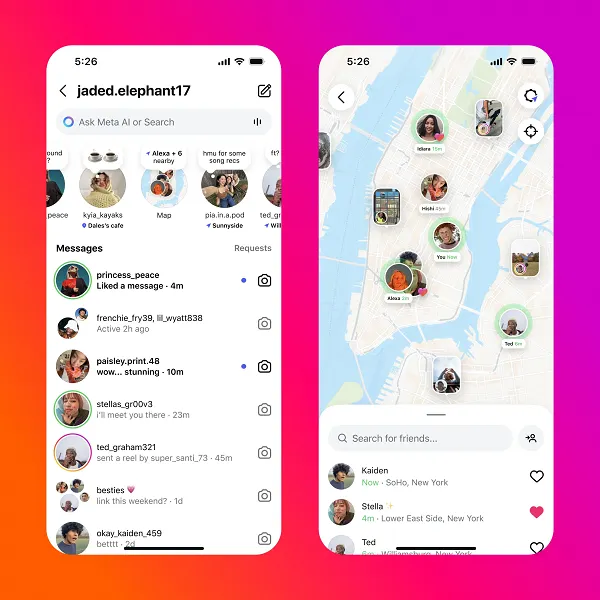
Think of it as pretty much the same as Snap Map, however, Snapchat does not have as many users as Instagram. This is one of the reasons that Snapchat has not witnessed the same level of backlash that Instagram’s now seeing.
The most important thing Instagram claims is that many people miss the feature of “an opt-in“. As, by default, the location of your phone is never shared.
Instagram in its official announcement post explained:
“You can opt into sharing your last active location with friends you pick, and you can turn it off anytime. You can also open the map to see content your friends and favorite creators are posting from cool spots. No matter how you use the map, you and your friends have a new, lightweight way to connect with each other.”
Note those first three words. “You can opt in“, which indicates that you have the option of opting in but it neither suggest that “you will,” nor “you already have” unless you manually switch it on.
Mosseri Clarifies ‘Nothing’s Off Without Consent‘
Instagram’s head Adam Mosseri quickly reiterate this point to clarify the matter:
“Your location will only be shared *if* you decide to share it, and if you do, it can only shared with a limited group of people you choose. To start, location sharing is *completely off.* If you do decide to share your location, the three options are a custom list you make, your Close Friends list, or followers you follow back.”
The options for sharing include:
- A custom list you create
- List of Your Most Close Friends list
- Followers that you follow are also following to follow back
Stories with Location Tags Function Differently
Mosseri also has to clarify the process for Stories location-sharing:
“If you tag a location in your story, that story will show up on the map for 24 hours. As always with Stories, this only shows the place you tagged to your followers – it does not share your real-time or live location.”
It is crucial for SEO professionals as well as social strategists to know that the location tags in Stories perform exactly the same way they have always done and do not have any additional real-time tracking.
Resolving the ‘It’s Already On’ Rumor
A few users claim that location sharing was turned on by default. According to Mosseri notes, the only way to get it working is if you have previously enabled the Instagram’s other location-tagging features and then posted an open Story that has the tag location. In any case, what is shown is the Story’s location, not the live location.
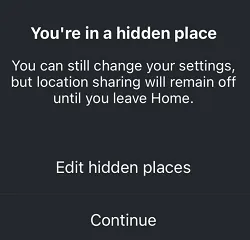
You can deactivate Friend Map location sharing by adjusting both the Instagram app’s settings and the location permissions on your device. You can also select the hide selected locations from the map for additional control.
Bottom Line
Friend Map sharing is not switched on by default. It does not broadcast your every step and can be turned off by default, so if you do not wish to utilize it, simply avoid it. As with any other location-based feature, whether it’s Instagram, Snapchat, or elsewhere, the best rule of thumb remains to share only with a select group of people, be aware of the settings you have set prior to sharing.