Best Time to Post on Instagram in 2026

The definitive, data-backed guide for global audiences and India — including Reels, Stories, Carousels & a complete day-by-day breakdown
- 3B+ Monthly Active Users
- 6M+Posts Analyzed
- ↑74% More Reach w/ Right Timing
You spent hours crafting the perfect Instagram post — the right caption, the best hashtags, a stunning visual.
Yet the likes barely trickle in. Sound familiar? The problem might not be your content. It might be when you’re posting.
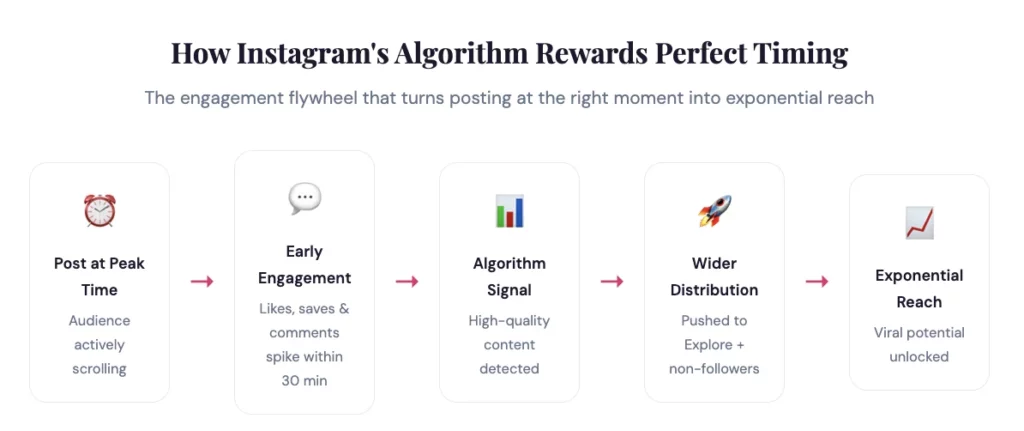
Timing on Instagram isn’t just a minor detail — it’s an algorithm-level signal. When your post gets immediate engagement in the first 30–60 minutes after publishing, Instagram’s algorithm treats it as high-quality content and amplifies it to a wider audience. Miss that window and even brilliant content gets buried.
This guide synthesizes data from over 6 million posts analyzed by Later, Sprout Social’s 2 billion engagement study, and Hootsuite’s 1 million post research to give you the most accurate, up-to-date answer to: what is the best time to post on Instagram?
Why Timing Matters for Instagram Success in 2026
- 74% Higher reach at peak posting times
- 30 min Critical algorithm evaluation window
- 4.5B Reels reshared daily across Meta
- 3x More saves at peak vs off-peak hours
Instagram’s algorithm evaluates every post during its first hour of life. The key signals it tracks: likes, comments, saves, shares, and watch time (for Reels).
A flood of early engagement tells the algorithm your content is worth promoting to the Explore page and to non-followers who’ve never seen your account before.
Key Algorithmic Insight
Instagram rewards engagement velocity, not just volume. A post that receives 100 likes in 10 minutes outperforms one that gets 500 likes spread over 24 hours. The algorithm reads early spikes as viral signals and amplifies accordingly. Timing is the trigger for this velocity.
Best Time to Post on Instagram Global Data (2026)
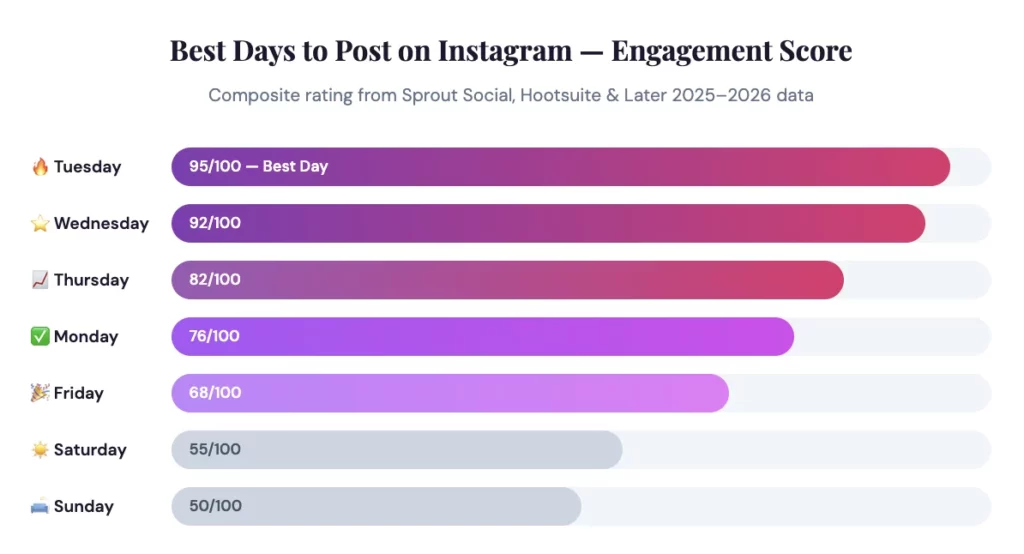
Based on Sprout Social’s analysis of nearly 2 billion engagements across 307,000 profiles and Hootsuite’s study of over 1 million posts, here are the universally best times to post on Instagram globally. All times are in your audience’s local time zone.
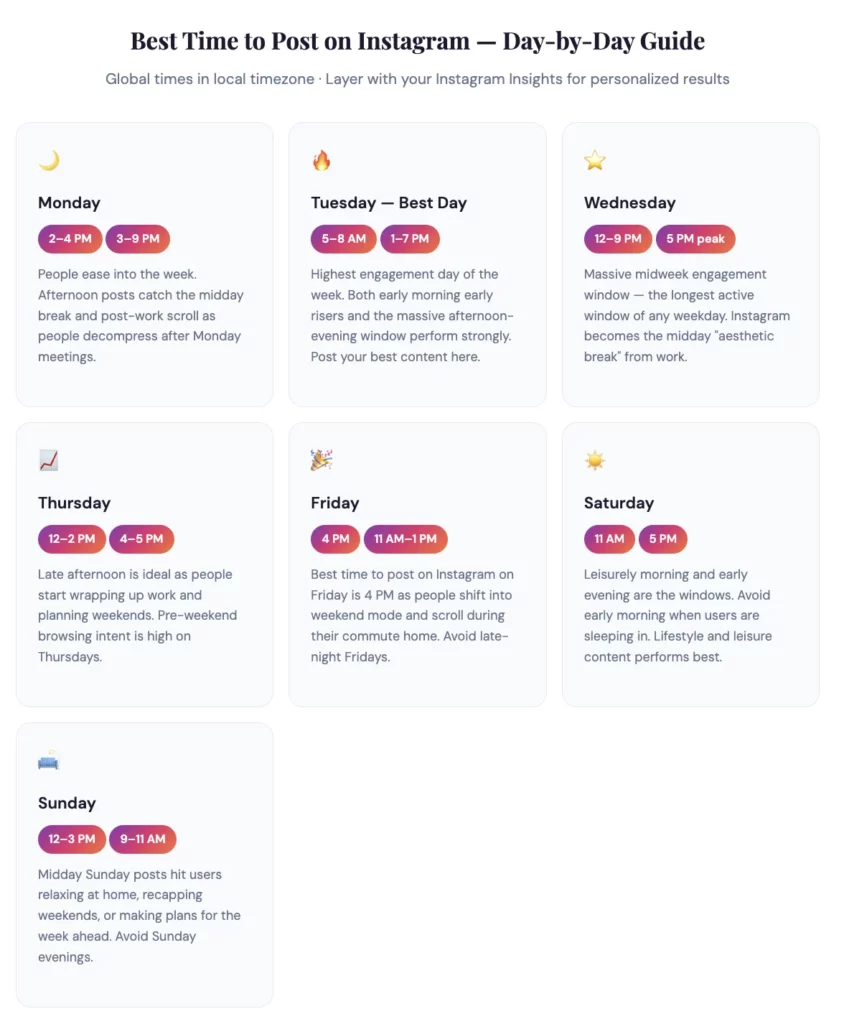
Top-line answer: The best times to post on Instagram are Tuesdays 1–7 PM and Wednesdays 12–9 PM local time. These midweek windows capture the “midday aesthetic break” when professionals step away from work to scroll Instagram, and the post-work wind-down in the evening.
Best Days to Post on Instagram Ranked
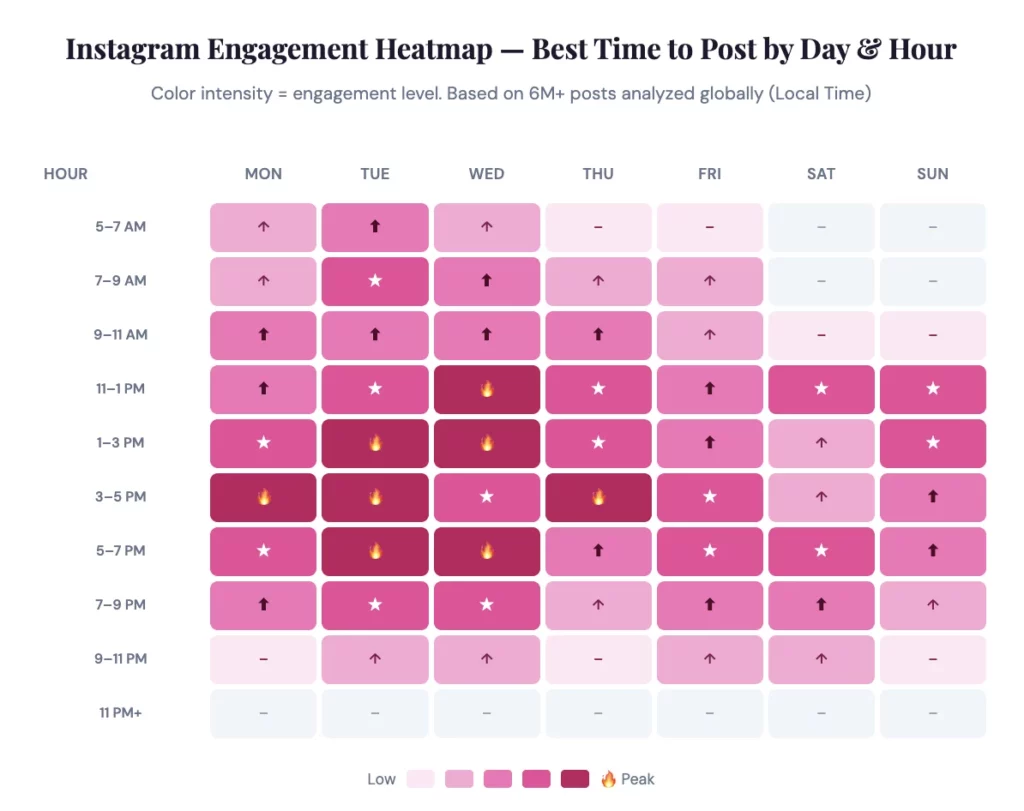
Not all days are created equal on Instagram. Here’s a data-backed ranking of the best days to post, with composite engagement scores based on multiple studies:
Best Time to Post on Instagram Every Day of the Week
Here is your complete day-by-day posting schedule with the best times to post on Instagram from Monday through Sunday, covering both the global sweet spots and the key behavioral reasons behind each window:
Best Time to Post on Instagram in India (IST)
India is one of Instagram’s largest and fastest-growing markets, with over 362 million users actively on the platform. If your audience is primarily Indian — whether you’re a creator, brand, or business — global posting time data won’t cut it. Indian usage patterns are distinctly different.
Indian Instagram users are heavily mobile-first, with strong engagement clusters during morning commutes (7–9 AM IST), lunch breaks (1–2 PM IST), and post-dinner relaxation (8–11 PM IST). The evening window of 6–9 PM IST is consistently the strongest engagement period across virtually all Indian niches.
India Behavioral Patterns
Unlike Western audiences where midday is dominant, Indian users split between three distinct windows: the morning commute scroll (metro/bus users checking Instagram), the lunch break browse (1–2 PM office and college break), and the prime-time evening session (6–10 PM, after work and dinner). Weekends see extended usage throughout the day, with mornings and evenings being the strongest windows.
Best Time to Post on Instagram in India
All times in Indian Standard Time (IST) · Based on Indian audience behavior research 2025–2026
| Day | Best Time Windows (IST) | Why It Works | Rating |
|---|---|---|---|
| Monday | 11 AM–1 PM7–9 PM | Lunch break scroll + post-work relaxation. Monday motivation content performs well. | ★★★★ |
| Tuesday ⭐ | 9–11 AM3–5 PM7–9 PM | Three strong windows: morning commute, afternoon break, evening prime time. Best overall day for India. | ★★★★★ |
| Wednesday ⭐ | 9 AM–1 PM8–10 PM | Strong midweek engagement. Extended daytime window + late evening second peak. | ★★★★★ |
| Thursday | 11 AM–12 PM4–6 PM | Pre-weekend mindset begins. Browse intent is high, especially for weekend planning content. | ★★★★ |
| Friday | 11 AM–2 PM6–8 PM | Weekend mode kicks in early. Entertainment, lifestyle, and food content sees strong engagement. | ★★★★ |
| Saturday | 11 AM–1 PM7–9 PM | Relaxed weekend browsing. High Reel engagement. Users explore, discover, and save content. | ★★★★ |
| Sunday | 9–11 AM6–8 PM | Leisure morning and pre-week relaxation window. Motivational and planning content resonates well. | ★★★★ |
Best Time to Post Reels on Instagram
Reels are Instagram’s highest-priority content format right now. Instagram reports that people reshare Reels more than 4.5 billion times per day across Meta platforms.
With Instagram actively testing Reels-first experiences in some markets, getting your Reel timing right has an outsized impact on your overall reach.
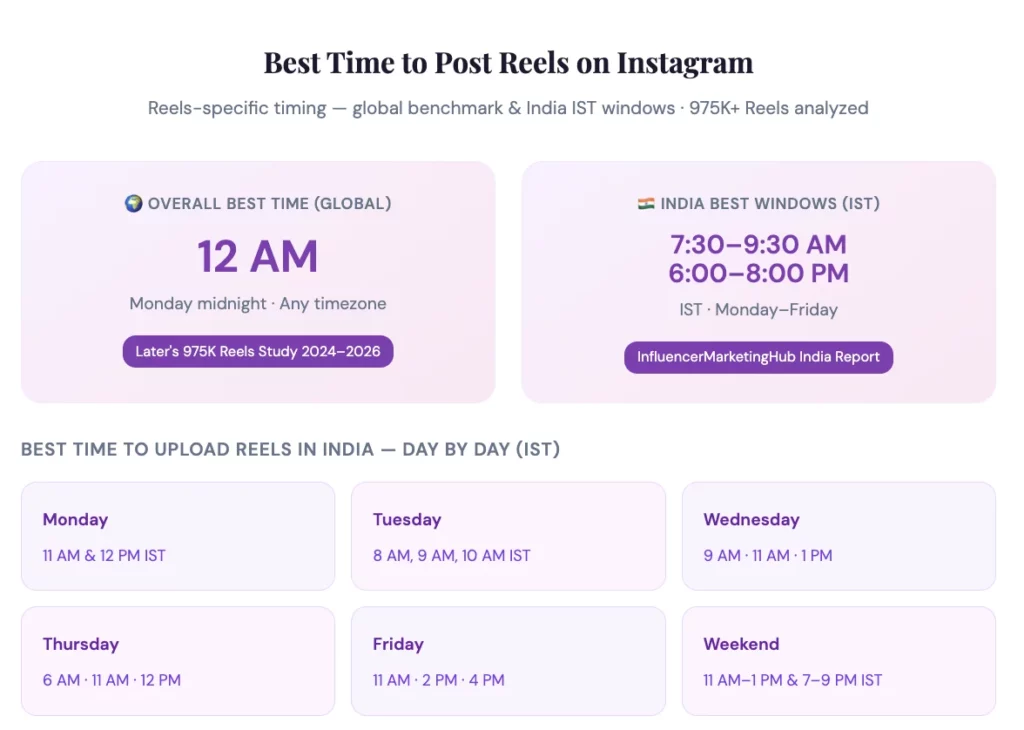
Reels have a unique timing characteristic: they often perform best when posted in lower-competition windows (early morning or late at night) because the algorithm continues to serve good Reels to users even hours after publishing, unlike feed posts that peak quickly and fade.
Pro Tip: Reels Strategy for India
For the best time to upload Reels on Instagram in India, focus on Monday–Wednesday in the morning (7:30–9:30 AM IST) to catch commuters, then 6–8 PM IST for prime-time evening viewers.
Reels posted Monday midnight also see unusually high engagement because there is less competition for algorithm attention at that hour, and the Reel continues distributing throughout Tuesday’s high-engagement day.
Best Times to Post on Instagram by Industry
Your industry significantly affects your optimal posting time because your audience’s daily schedule varies. Here are the best Instagram posting windows by major industry category:
- Fashion & Beauty Tue–Thu · 12–3 PM · Sat 11 AM
- Food & Restaurants Mon–Fri · 11 AM–1 PM · 7 PM
- Travel & Lifestyle Tue–Wed · 9 AM–1 PM
- Health & Fitness Mon–Wed · 6–8 AM · 5 PM
- Tech & B2B Tue–Thu · 10 AM–2 PM
- Education & Coaching Mon, Wed, Fri · 4–7 PM
- Healthcare Mon, Wed · 12–9 PM & 11 AM–5 PM
- E-commerce & Retail Tue–Thu · 12–3 PM · Sat 11 AM
How to Find YOUR Personal Best Time to Post on Instagram
The data above is a powerful starting point, but the single most important tool you have is your own Instagram Insights.
Generic data represents averages across millions of accounts — your specific audience may behave differently based on your niche, location, content type, and follower demographics.
Step-by-Step: Using Instagram Insights to Find Your Best Time
- Switch to a Creator or Business account (free)
- Go to Profile → tap “Professional Dashboard”
- Tap “Total Followers” → scroll to “Most Active Times”
- Check both “Hours” and “Days” data tabs
- Note your top 2–3 peak hour windows per day
- Schedule posts 15–30 min before your peak window
- Test consistently for 4 weeks minimum
- Review engagement rate (not just likes) to find winners
Final Verdict: The Best Time to Post on Instagram in 2026
After analyzing data from over 6 million posts across three major research studies — Later, Sprout Social, and Hootsuite — here is the definitive verdict on the best time to post on Instagram:
- Global Best: Tuesday & Wednesday, 1–7 PM local time.
- Best for Reels: Monday midnight (12 AM) or any early morning 3–6 AM local time.
- Best for India: Tuesday–Wednesday, 7–9 PM IST. Secondary windows: 7:30–9:30 AM IST and 12–2 PM IST any weekday.
- Best Day Overall: Tuesday, followed by Wednesday and Thursday.
- Worst Times: Before 5 AM and after 10 PM on any day. Sunday evenings. Early Saturday/Sunday mornings.
These insights are powerful — but they’re averages. The single most impactful thing you can do is open your Instagram Insights right now, check when your followers are most active, and test posting 15–30 minutes before that window.
Do this consistently for 4 weeks, track your engagement rate (not just likes), and you’ll discover a posting schedule that outperforms any universal benchmark.
Remember: timing is the amplifier, not the engine. Great content posted at the wrong time will underperform.
Average content posted at the right time will do better than expected. But great content posted at the right time? That’s when Instagram magic happens.


FAQs on Best Time to Post on Instagram

The 5-3-1 rule on Instagram suggests engaging with five posts, commenting on three, and sending one direct message each day to build authentic relationships.
It’s less about chasing the best time to post on Instagram and more about creating consistent interactions that boost visibility. When combined with smart posting schedules, this approach helps you grow engagement naturally.
The most active time on Instagram is usually weekdays during mid-day (around 10 a.m. to 3 p.m.) and evenings after 6 p.m., when people are taking breaks or winding down.
Studies often point to Wednesday as a strong engagement day. Still, your personal best time to post on Instagram depends on your own audience, so checking Insights is crucial.
In India, the best time to post on Instagram generally aligns with lunch hours (11 a.m.–1 p.m.) and evenings (7-9 p.m.) when users are most active.
Engagement during weekends can be lower, but Sunday evenings often see a spike. To fine-tune your timing, analyse your Insights and adjust for your followers’ specific habits.
The golden hour to post on Instagram usually refers to early evenings, around 6–8 p.m., when people are most active online after work or study.
This window often overlaps with some of the general best times to post, giving your content a better chance of standing out. Test this slot alongside lunch hours to see if it works best for your niche.
Yes. As your follower base expands into new regions or demographics, your engagement windows shift. Regular Insights checks help you adjust your schedule.
It depends on your niche and content quality. Posting more frequently can help, but only if your content remains consistent in value.
Timing mainly affects the first two to three hours. Strong early engagement increases long-term reach through the algorithm.
Yes, but only for certain niches like travel, entertainment, and lifestyle. Professional and B2B content still performs best on weekdays.
Absolutely. Audience behaviour varies by country, time zone, and culture. A global account must use staggered posting schedules.