All SEO
  SEO News
  SEO Strategy
  Ask An SEO
  Enterprise SEO
  Google Algorithm Updates
  International SEO
  Link Building
  Local SEO
  Mobile SEO
  On-Page SEO
  Technical SEO
  Vertical SEO
  Wordpress for SEO
  Web Dev for SEO
  SaaS SEO
  E-commerce SEO
  AI-Driven SEO
 Threads Introduces Topic-Based Communities to All Users


Threads introduces topic-based communities to all users, helping people connect through shared interests and conversations.
After a few weeks of testing with selected creators, Threads has officially announced its topic-based communities feature to all users. This new feature provides Threads members with a private space for bonding over shared interests and discovering relevant conversations within the app’s larger user community.
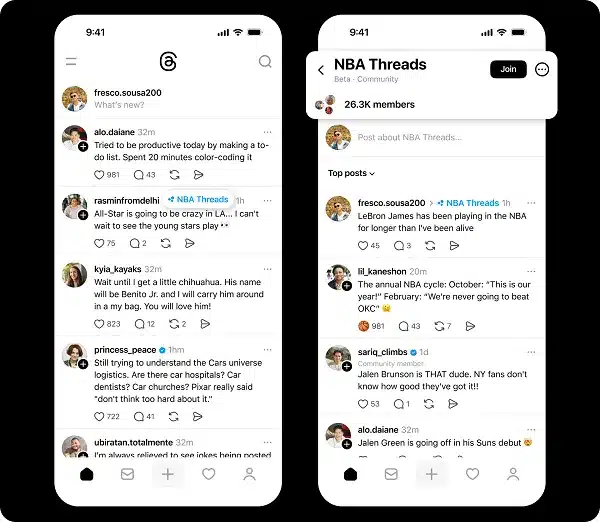
Threads Communities Overview
Threads communities are group chatrooms dedicated to specific topics, such as basketball, K-pop, books, and more. Content shared for any of the communities you join, however, will be republished in your main “For You” feed and branded to show the community’s origin.
With the growth of communities on X, the time spent in them increased by 600% year over year. This shift toward more private, topic-focused conversations could be a smart way to drive overall engagement for the platform.
As explained by Threads:
“As Threads has grown, we’ve seen people come together to develop and share their passions and expertise. With communities, it’s now even easier to find and connect with your people – and stay up-to-date on conversations you care about.”
Today, Threads offers more than 100 communities in the app that focus on popular areas of interest, it notes.
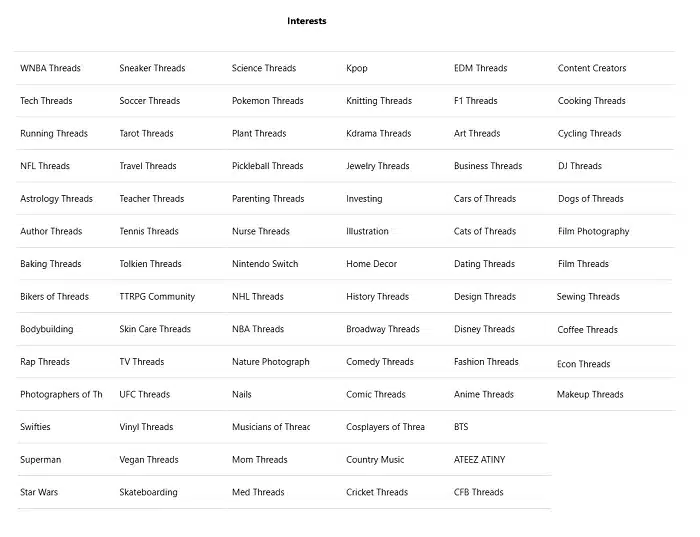
New communities are quickly discovered by users searching for names or tapping community tags, which are displayed alongside posts. To join, tap “Join” on the community page.
“A three-dot icon on a topic tag indicates that it has a dedicated community. To join, tap Join in the top right.”
Community memberships are public, and any group you join will automatically appear in your feed menu, accessible by swiping right from the main feed, and be displayed on your profile, allowing others to see the topics and interests you’re connected to.
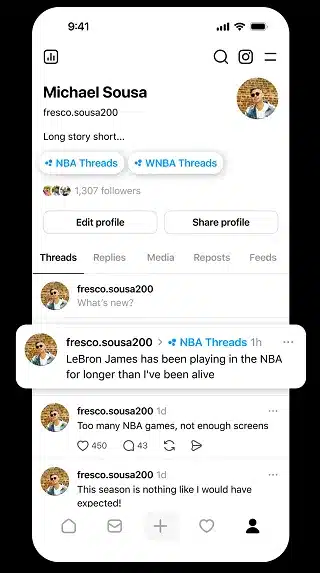
Each community also comes with its very own “Like” emoji customized based on the theme of the community (such as a basketball for NBA Threads), which further helps make discussions feel unique and encourages participation.

Designed to Boost Engagement and Connection
Threads states:
“These individuals are among the most active and engaged users on the app and have helped establish communities around the most popular discussion topics. We’re also working on ranking within communities and the For You feed so that you see the most relevant posts first.”
With these more focused groups, that’s precisely what Threads hopes to do. It helps you find and connect with like-minded people while also driving engagement outside of the open timeline.
Differences Compared to X Communities
Like X’s Communities, Threads communities are based on the idea that:
- Only Meta can build and run the communities; users cannot start them.
- Non-members have access to community posts and can participate in discussions, but members who’ve joined get special perks, custom emojis, and upcoming badges for star contributors.
- Communities are integrated into user profiles and feeds without an option to opt out of joining.
These design decisions echo Threads’ approach to structuring topical conversations based on existing user interests that were already emerging organically around Topic Tags.
Early Adoption and Future Potential
There are more than 100 trending communities across the platform so far. Meta plans to expand this list while working to improve how posts are ranked within communities and across the feed, presenting users with the most relevant content.
With 400 million monthly active users and growing, Threads is quickly closing in on X. Additionally, the forums feature could be crucial in converting lurkers into engagers by facilitating more meaningful and topical engagement.
Participating in or producing content for Threads communities is an opportunity to tap into engaged audiences who are passionate about specific subjects. Brands can deploy their messaging within these niche groups, increasing the level of targeting and resonance.
As these communities develop, they’ll likely become one of the central places to discover, discuss, and exert influence on Threads, a significant step forward for social media.
Bottom Line
For pinners who want to explore Threads communities, start by searching for topics you’re interested in or joining ones connected to posts in your feed. This feature is a significant step forward for the evolution of Threads, fostering stronger bonds and expanding its ecosystem.